Wooden Key and Lock Puzzle Laser Cut: A Practical Tool for Creative and Educational Workflows
Understanding the Wooden Key and Lock Puzzle Laser Cut
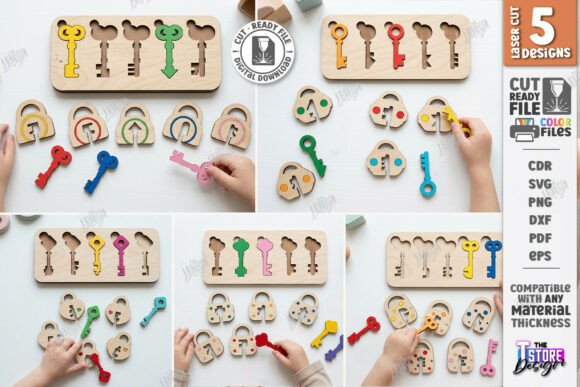
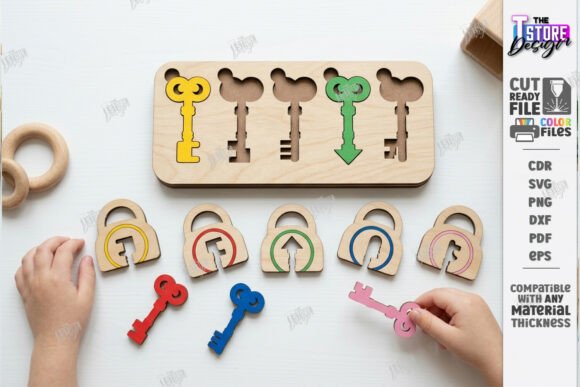
The Wooden Key and Lock Puzzle Laser Cut is more than just a laser-cut design—it’s a flexible, interactive tool that bridges creativity, education, and craftsmanship. Designed for precision and adaptability, this product includes a set of vector files (SVG, EPS, PNG, PDF, DXF) that allow makers, educators, and hobbyists to produce engaging wooden puzzles using laser cutting or CNC routing machines. Whether you're building educational toys for preschoolers or crafting custom Montessori-inspired learning tools, this design offers a structured yet customizable foundation for your project.
Integration into Creative and Educational Processes
From the early stages of project planning to the final execution, the Wooden Key and Lock Puzzle Laser Cut fits naturally into a variety of creative and educational workflows. Before production begins, it's essential to assess the compatibility of your cutting machine and software with the provided file types. This ensures a smooth transition from digital design to physical creation. Once that’s confirmed, the puzzle pattern can be scaled, customized, or grouped with other designs to maximize material usage and efficiency in production.
During the cutting process, the clear distinction between red lines (cut) and black lines (engrave) simplifies the setup in laser cutting software. This dual-function design allows for both structural cuts and decorative engravings within the same file, reducing the need for multiple design iterations. After cutting, the pieces can be assembled, sanded, and finished according to the intended use—whether for a child’s learning activity board or a custom educational toy for a Montessori classroom.
How It Works With Other Tools and Systems
This laser-cut design doesn't exist in isolation. It integrates seamlessly with a range of tools and platforms commonly used in digital fabrication and educational design. For example, the SVG and DXF files can be imported into popular design software like Adobe Illustrator, Inkscape, or CorelDRAW for further customization. CNC router users can import the files directly into their machine control software, streamlining the transition from concept to creation.
Additionally, the Wooden Key and Lock Puzzle Laser Cut works well alongside other educational materials and tools. It can be paired with sorting trays, color-coded labels, or shape recognition cards to enhance learning outcomes. For homeschooling environments or early childhood education centers, this design can be part of a broader toolkit that includes sensory bins, motor skill development boards, and fine motor coordination activities.
Practical Implementation Tips for Smooth Workflow
- Test your file compatibility before cutting. Open the SVG, DXF, or PDF in your design software to ensure all elements are properly recognized.
- Adjust settings based on material. Plywood thickness and type affect laser power and speed settings. Run a test cut on a scrap piece before final production.
- Batch production increases efficiency. If you're making multiple puzzles, nest the pieces in your design software to minimize waste and optimize cutting time.
- Label and organize pieces after cutting. Especially when producing for educational use, keeping keys and locks sorted by color or shape aids in usability and storage.
- Customize for audience. Engrave letters, numbers, or symbols to adapt the puzzle for different learning levels or language needs.
Usability and Long-Term Value
One of the key strengths of the Wooden Key and Lock Puzzle Laser Cut is its usability across different environments. As a Montessori educational toy, it supports color and shape sorting, fine motor development, and cognitive pattern recognition. As a homeschooling craft, it offers a hands-on way to teach planning, execution, and problem-solving. And for makers and small business owners, it represents a scalable product that can be branded, sold, or used in workshops and classes.
In terms of long-term use, the durability of laser-cut plywood ensures that the puzzles can withstand repeated handling, cleaning, and storage. This makes the design ideal for classrooms, daycare centers, and home learning stations where consistency and reusability are important. Additionally, because the files are digital, you can revisit the design at any time to make updates or create variations for different age groups or themes.
Quality Control and Consistency in Production
Maintaining quality and consistency is crucial when producing multiple units of the same design. To ensure each puzzle performs as expected:
- Use high-quality plywood with consistent thickness and smooth surface finish.
- Calibrate your laser or CNC machine before each production run.
- Perform a dry fit of the puzzle pieces before final assembly to check for fit and function.
- Apply a child-safe finish if the puzzle will be used by toddlers or young children.
- Document your settings and workflow steps to replicate results across future batches.
Workflow Example: From Purchase to Classroom Use
Imagine you're an early childhood educator looking to enhance your classroom materials. You purchase the Wooden Key and Lock Puzzle Laser Cut digital file and download the zip archive. After opening the SVG in your laser cutting software, you adjust the size to fit your available plywood and add custom engravings for letter recognition. You run a test cut, then proceed to cut a full set of puzzles. After sanding and finishing, you organize the pieces by color and shape. Within a week, the puzzles are in use, helping children develop fine motor skills, shape recognition, and problem-solving abilities.
Support and Customization Options
If you encounter any issues or have specific needs—like a different file format, color variation, or size adjustment—you can reach out to the seller for support. This level of flexibility ensures that the Wooden Key and Lock Puzzle Laser Cut can adapt to your specific project requirements. Whether you're working on a personal craft, a commercial product, or an educational resource, the ability to request customizations or clarifications enhances the overall usability of the design.
Final Thoughts on Implementation and Adaptation
The Wooden Key and Lock Puzzle Laser Cut isn't just a design file—it's a process-ready solution for educators, makers, and entrepreneurs who value precision, adaptability, and practical implementation. By understanding how it fits into your workflow, interacts with other tools, and supports long-term use, you can unlock its full potential as both a creative asset and an educational resource. Whether you're crafting toys, designing classroom materials, or building a product line, this laser-cut pattern provides a solid foundation for success.