Kids Wooden Balance Toy Laser Cut Bundle: A Guide for Creators and Educators
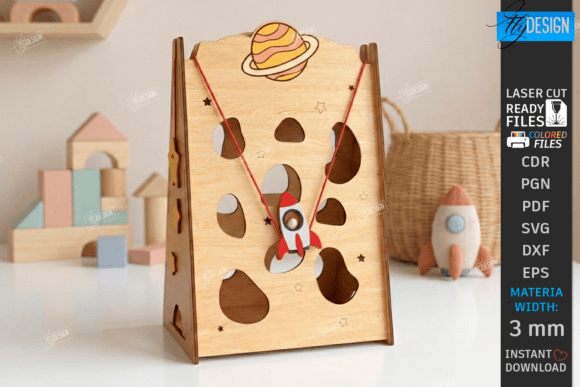
The intersection of Montessori education principles and modern digital fabrication has created a thriving market for interactive wooden toys. Among the most popular designs is the Kids Wooden Balance Toy Laser Cut Bundle, a collection of files designed to create vertical mazes and dexterity games. These projects are particularly appealing because they combine the tactile satisfaction of working with wood with the developmental benefits of fine motor skill training. However, simply purchasing the digital files does not guarantee a successful physical product. The difference between a polished, safe toy and a frustrating, unusable prototype often lies in the details of file management, material selection, and machine settings.
Understanding the Value of Digital Design Files
When you acquire a Kids Wooden Balance Toy Laser Cut Bundle, you are not buying a finished toy but rather the blueprint for one. These bundles typically include a variety of file formats such as SVG, EPS, PNG, PDF, and DXF. This diversity is intentional, catering to different software ecosystems used by hobbyists and professionals alike. For educators looking to add hands-on activities to their curriculum or small business owners seeking a new product line, these files offer a low-barrier entry point into manufacturing high-quality educational tools.
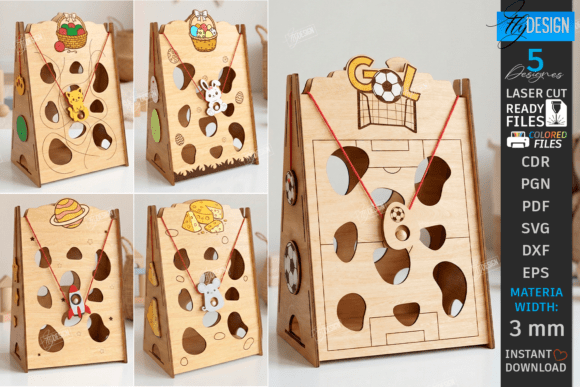
The specific design of an Easter-themed vertical maze, for example, requires precise geometry. The marbles must roll smoothly, and the gates must open with just the right amount of force. If the design is compromised during the cutting process, the entire educational value of the toy diminishes. A gate that sticks or a track that is too narrow turns a lesson in cause-and-effect into a source of frustration for the child. Therefore, understanding how to handle these digital assets is just as important as owning them.
Common Pitfalls in File Selection and Software
One of the most frequent mistakes makers encounter involves the choice of file format within their laser cutting software. Many beginners assume that SVG files are universally compatible and dimensionally stable across all platforms. While SVGs are excellent for vector graphics on the web, they can be problematic in industrial laser software like Lightburn. It is a known issue that Lightburn may sometimes distort the dimensions of SVG files, leading to parts that do not fit together correctly.
If you ignore this nuance, you risk wasting expensive 3mm plywood on a batch of parts where the balance beam is slightly too short or the base is misaligned. The result is a toy that cannot be assembled or functions poorly. To avoid this, experienced creators prioritize the DXF file format when working with Lightburn. DXF files generally maintain their geometric integrity better in this environment, ensuring that the cut lines match the designer's original specifications exactly.
Interpreting Line Colors Correctly
Another critical area where errors occur is the interpretation of color-coded instructions within the design files. In the Kids Wooden Balance Toy Laser Cut Bundle, the instructions are clear: RED lines indicate where the laser should CUT, while BLACK lines indicate where it should ENGRAVE. Failing to map these colors to the correct power and speed settings in your software can ruin the aesthetic and structural integrity of the project.
If you engrave a cut line, you will end up with a part that is still attached to the surrounding material, requiring manual finishing that often leaves rough edges. Conversely, if you cut along an engraving line intended for decoration or text, you will accidentally slice through your design. Always take a moment to review your software's color-to-operation mapping before firing up the laser. This simple check prevents material waste and ensures the final product looks professional.
Material Considerations for Safety and Durability
The bundle specifies 3mm plywood as the ideal material, and for good reason. Plywood offers a balance of rigidity and workability that is essential for moving parts like balance beams and gates. Using materials that are too thick can prevent the moving components from sliding freely, while materials that are too thin may lack the durability needed for repeated play.
A common oversight is using lower-quality plywood that contains voids or excessive glue. When the laser cuts through these imperfections, it can create uneven edges or burn marks that look unprofessional. More importantly, for a toy intended for children, the quality of the finish matters. Rough edges can pose a safety hazard. Before starting a production run, always test-cut a scrap piece of your chosen plywood to verify the grain direction and thickness consistency. This step ensures that the final assembly feels smooth and safe for little hands.
Optimizing Your Workflow for Better Results
To get the most out of the Kids Wooden Balance Toy Laser Cut Bundle, adopt a workflow that prioritizes testing and verification. Do not rush to cut the entire set immediately after downloading the zip archive. Instead, start with a single unit. Verify that the DXF files load correctly without distortion in your preferred software. Check that the red and black lines are assigned to the correct operations.
Once you have a successful test piece, inspect the fit. The gates in the vertical maze should move freely but not be so loose that they fall off. The balance beam should pivot smoothly. If adjustments are needed, minor tweaks can be made in the software before committing to a full batch. This iterative approach saves time and resources in the long run.
Furthermore, keep communication open with the creator of the files. The bundle description notes that if you need alternative file types or different sizes for PNG images, you should reach out. There is no need to struggle with incompatible formats when support is available. Whether you are a beginner learning the ropes of CNC and laser cutting or a seasoned entrepreneur scaling a nursery activity line, utilizing available resources ensures a smoother production process.
Final Thoughts on Quality and Satisfaction
Creating educational toys like the Kids Wooden Balance Toys Laser Cut Bundle Interactive Laser Cut Game Designs is a rewarding endeavor. It allows you to contribute to a child's development while mastering valuable fabrication skills. By paying attention to file formats, adhering to color-coded instructions, and selecting the right materials, you can avoid common pitfalls and produce high-quality results.
Remember that the goal is not just to cut wood, but to create a functional, engaging experience. Taking the time to understand the technical requirements of the digital download ensures that your final product meets the high standards expected by parents, educators, and children alike. With careful planning and the right approach, these laser-ready files can become the foundation for beautiful, durable, and educational playthings.