Cross Stitch Animals Bundle Montessori: A Workflow for Creators and Educators
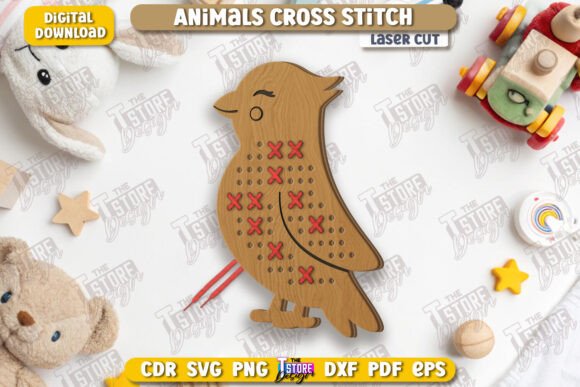
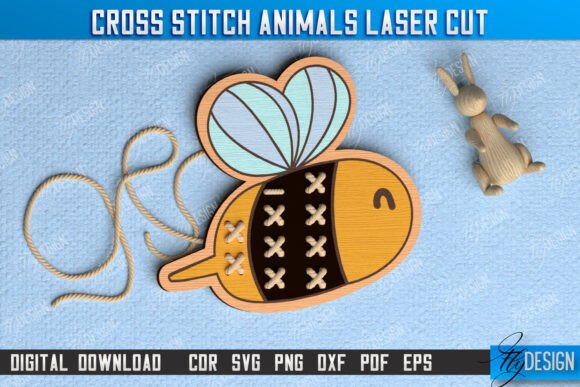
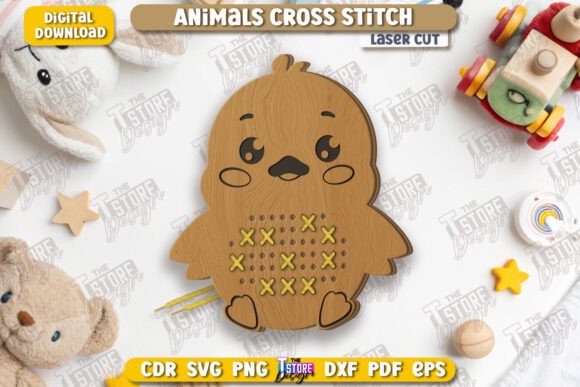
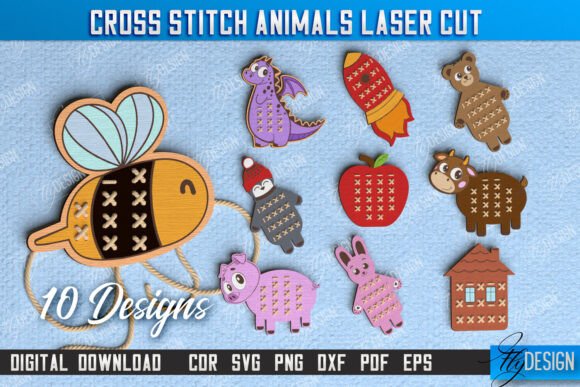
The integration of digital design assets into physical production workflows has become a cornerstone for modern small business owners, educators, and hobbyists. For those operating in the realm of handmade educational toys, the Cross Stitch Animals Bundle Montessori represents more than just a collection of images; it is a foundational asset that bridges the gap between digital planning and tangible creation. This bundle is specifically engineered to support the production of lacing games and cross-stitch style animal figures using laser cutting technology. Understanding how to deploy these files effectively requires a clear grasp of the file formats, software compatibility, and the specific workflow stages where they add value.
Understanding the Asset Structure and File Formats
Before initiating any project, a creator must audit their available resources to ensure they align with their hardware capabilities. The Cross Stitch Animals Bundle Montessori is delivered as a comprehensive zip archive containing ten distinct variations across five critical file formats: SVG, EPS, PNG, PDF, and DXF. Each format serves a specific purpose within the production pipeline, and selecting the wrong one can lead to inefficiencies or quality issues.
For vector-based operations, such as setting up cut paths and engraving guides, the SVG and EPS files are standard industry choices. However, the DXF format often proves superior for specific laser cutting ecosystems. If your workflow relies on Lightburn software, you may encounter dimensional distortions when importing SVG files. This is a known variable in digital fabrication workflows. To maintain precision and ensure the final product matches the intended specifications, the recommended practice is to utilize the DXF files provided in this bundle. By prioritizing DXF for Lightburn users, you mitigate the risk of scaling errors and ensure that the "RED line - CUT" and "BLACK line - ENGRAVE" instructions are executed with high fidelity.
- SVG Files: Ideal for general vector editing but require caution with Lightburn due to potential scaling artifacts.
- DXF Files: The preferred format for Lightburn to ensure accurate dimensions and clean cuts.
- EPS Files: Excellent for high-end vector manipulation in Adobe Illustrator or similar professional suites.
- PNG Files: Useful for mockups, marketing materials, and visual previews before production begins.
- PDF Files: Great for documentation, sharing with clients, or printing reference guides.
Integrating Design Assets into the Production Workflow
The utility of the Cross Stitch Animals Bundle Montessori extends beyond simple file conversion. It fits into a broader process that spans from initial concept validation to final quality control. When planning a new line of educational toys, the first step involves selecting the appropriate designs from the bundle. These animals are designed with the Montessori philosophy in mind, focusing on fine motor skill development through lacing activities. This makes them particularly relevant for educators and parents looking for structured learning tools.
In the preparation phase, the workflow involves opening the chosen file in your laser cutting software. Here, the distinction between the red and black lines becomes operational. The red lines dictate where the laser should cut through the material, defining the shape of the animal and the holes for lacing. The black lines indicate areas for engraving, which might include texture details like fur patterns or facial features. This dual-layer approach allows for a single-pass operation in many machines, significantly increasing efficiency. Instead of running separate jobs for cutting and detailing, the machine executes both actions sequentially based on the color-coded paths embedded in the file.
Once the software settings are configured, the actual execution begins. This stage requires attention to material selection. While the files are compatible with various woods and acrylics, the thickness of the material must correspond with the power and speed settings of your laser cutter. Consistency in material choice ensures that every unit produced meets the same safety and durability standards, which is crucial for children's toys. After the cutting and engraving process, the pieces move to the assembly stage. This is where the digital design transforms into a functional toy. The lacing component adds an interactive element, turning a static wooden piece into a dynamic learning tool.
Optimizing Software Compatibility and Quality Control
A common bottleneck in digital fabrication is the interaction between design files and control software. As noted, Lightburn can sometimes distort SVG dimensions. This issue highlights the importance of testing files before committing to a full production run. A practical implementation tip is to create a test sheet using scrap material. Run a single animal design from the Cross Stitch Animals Bundle Montessori using both the SVG and DXF versions. Measure the output against the expected dimensions. If discrepancies appear in the SVG version, switch immediately to the DXF version for the main production batch. This proactive quality control step saves time and material costs.
Furthermore, the versatility of the included file formats allows for flexibility across different teams or collaborators. If you work with a partner who uses CorelDraw or Inkscape, the EPS and SVG files provide the necessary compatibility. For those creating marketing content, the high-resolution PNG files allow for crisp images on websites and social media without the need for complex rendering. This multi-format approach supports a streamlined business workflow where design, production, and marketing teams can access the exact asset type they need without redundant conversions.
Strategic Use Cases for Educators and Entrepreneurs
For educators, the Cross Stitch Animals Bundle Montessori offers a cost-effective way to customize classroom resources. Rather than purchasing pre-made toys that may not fit specific curriculum goals, teachers can produce custom sets tailored to their students' needs. The lacing game aspect directly targets hand-eye coordination and dexterity, key components of early childhood development. By producing these in-house, schools can also ensure that the materials used are non-toxic and sustainable.
Entrepreneurs and small business owners can leverage this bundle to expand their product catalogs quickly. The variety of ten different animal designs provides enough diversity to create a cohesive product line without overwhelming inventory management. Because the files are digital, there is no upfront cost for molds or tooling. The primary investment lies in the laser equipment and raw materials, allowing for a scalable business model. As demand grows, the production process remains consistent because the digital files do not degrade over time.
When integrating these assets into a business plan, consider the long-term usability of the files. Unlike physical stencils that wear out, the digital nature of the Cross Stitch Animals Bundle Montessori means you can reproduce items indefinitely. This longevity supports a stable revenue stream for makers selling at craft fairs, online marketplaces, or local boutiques. Additionally, the ability to request alternative file types or PNG sizes from the seller adds a layer of customer service that can resolve technical hurdles quickly, ensuring that production timelines are never delayed by formatting issues.
Implementation Tips for Seamless Execution
To maximize the value of this bundle, adopt a systematic approach to file organization. Create a dedicated folder structure on your computer that separates raw files from processed job files. Keep the original zip archive intact as a backup. Within your working directory, organize subfolders by file type (e.g., "Production_DXF", "Marketing_PNG"). This organizational habit reduces the time spent searching for assets during busy periods and minimizes the risk of accidentally modifying the source files.
Another critical factor is communication. If you are part of a larger team or outsourcing parts of the process, clearly document the "RED line - CUT" and "BLACK line - ENGRAVE" protocol. Ensure everyone involved understands that the color coding is not merely aesthetic but functional. Misinterpreting these lines can result in wasted material and defective products. Establishing a standard operating procedure (SOP) for importing these files into your laser software will streamline the transition from design to manufacturing.
Finally, remain adaptable. Technology and software evolve rapidly. While the current recommendation favors DXF for Lightburn, future updates to software may change these dynamics. Staying informed about best practices in laser cutting and maintaining open lines of communication with the file provider ensures that your workflow remains efficient. If you encounter unique challenges or require specific modifications, reaching out to the seller for alternative file types or sizes is a viable strategy. This collaborative approach fosters a resilient production environment capable of adapting to changing demands.
The Cross Stitch Animals Bundle Montessori is a robust tool for anyone serious about creating high-quality, educational, and aesthetically pleasing products. By understanding the nuances of file formats, adhering to software best practices, and integrating these assets into a well-planned workflow, creators can achieve consistent results. Whether you are an educator enhancing a classroom experience or an entrepreneur building a brand, the strategic use of these digital files lays the groundwork for success. The key lies in preparation, precision, and the willingness to optimize every step of the process for maximum efficiency and quality.